SMS Auto Reply - Autoresponder
- 3.1
- Rating
- 10.00K
- Installs
- $7.49
- Price

 Analysis by App-foxy
I find SMS Auto Reply - Autoresponder most useful as a small, focused communication tool rather than a complete messaging replacement. Its purpose is straightforward: when I am busy, away from my phone, or unable to answer immediately, it can send an automatic text response. That sounds simple, but the value depends heavily on getting the setup right and understanding what the app can realistically control.
Developed by LeMi Apps | SMS Automation & Auto Reply Apps, this Android communication app is aimed at people who still rely on ordinary SMS and want a more dependable way to acknowledge incoming messages. The store summary also points to away responses, busy messages, and blocking texts, so its appeal goes beyond a single out-of-office reply. In my experience, the strongest reason to consider it is convenience: a short, carefully written response can prevent callers or contacts from assuming that I have ignored them.
The app has been available since December 4, 2014, and the current version is 8.8.4. It requires Android 6.0 or later, is rated for Everyone, and costs $7.49. That price makes the decision more serious than downloading a free utility for occasional experimentation. I would want a clear use case before paying for it, especially because the average rating is 3.1 from around 500 ratings and the app has passed 10K+ installs. Those figures suggest that the experience is useful for some people but not universally smooth.
You May Also Like

 Pandora - Music & Podcasts
Pandora’s Music Is Easy to Start, but Harder to Recover
Pandora’s strength is its low-effort path from a seed to a station. Its weak spot is how much confidence it asks you to place in connection, setup, and quiet recovery.

 8 Ball Pool
 Is Built on Rivalries, Rematches, and Routine
A close look at the rivalries, rematches, shared routines, and unanswered safety questions that turn a quick pool match into a persistent mobile community.

 Samsung Music
’s Quiet Strength Is Playing What You Already Own
Its reach comes less from spectacle than from dependable access to a personal library. That simplicity is both the app’s strongest retention engine and its ceiling.

 AccuWeather: Weather Radar
AccuWeather Review: A Quick, Clear Forecast for Everyday Decisions
For everyday plans, the best forecast is the one you can understand quickly. AccuWeather makes rain timing, radar, and local conditions easy to act on, with a few trade-offs.

 Hill Climb Racing
Why Hill Climb Racing Still Turns Crashes Into One More Run
A tiny car, a bumpy hill and one more upgrade: Hill Climb Racing keeps resurfacing because its simple chaos makes every near-miss feel personal.

 AliExpress - Shopping App
AliExpress Makes Global Shopping Feel Personal, but Shoppers Bear the Risk
AliExpress turns a global marketplace into a pocket-sized discovery engine. Its reach is useful, its shopping loop compelling, and its trade-offs easy to miss.
More From Our News Desk
View All News


Where the setup usually becomes difficult
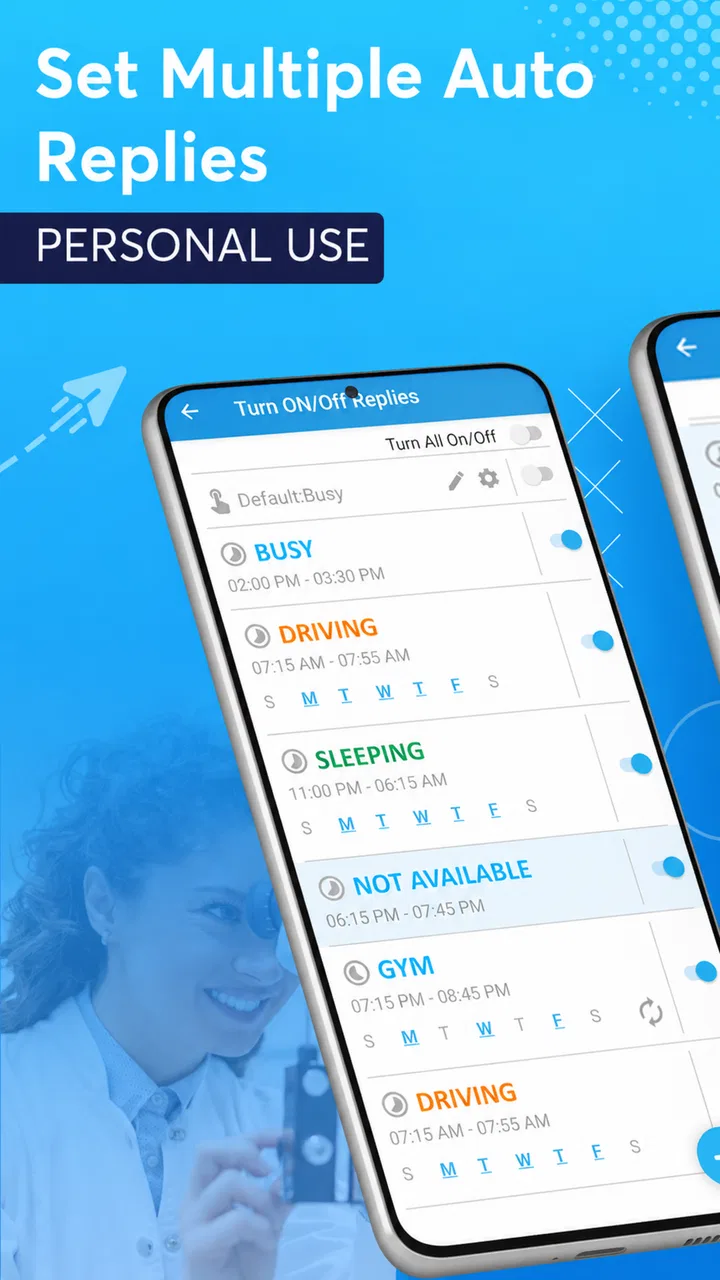
The hardest part is not writing the message. It is making sure the automation behaves as intended when a real text arrives. A typical user may create a reply such as “I’m driving and will answer later,” activate it, and then assume the job is finished. If the response does not appear, the problem may be an inactive rule, an overly narrow condition, a phone setting, or the way the device handles background activity.
I recommend treating the first setup like a small test rather than trusting it immediately. Start with one simple response and one familiar contact. Send a test message from another phone, then check whether the reply arrives and whether it is sent only when the intended condition is active. This is more useful than testing with several rules at once, because it shows exactly which part of the configuration is working.
Another common point of friction is confusing a saved message with an active automation. A text can be ready in the app without the rule actually being enabled. Before relying on it during a meeting, trip, or driving period, I would open the relevant setting again and confirm that the response is switched on. The extra few seconds are worthwhile because an automatic reply that looks configured but is inactive is worse than no automation at all: it creates false confidence.
Message wording also deserves more care than people expect. An automatic SMS should explain the situation without promising a response at a precise time unless I know I can keep that promise. I prefer short wording that identifies the reason for the delay and sets a general expectation. For example, “I’m unavailable right now and will read your message when I can” is safer than giving a definite return time that may become inaccurate.
Start with one rule instead of building a complicated system
Although the app’s feature set suggests different situations for away, busy, and blocked texts, I would not configure every possible scenario on the first day. Multiple overlapping rules can make troubleshooting confusing. If two conditions appear to apply to the same incoming message, it becomes harder to tell which response should be sent or why a particular contact received it.
My preferred approach is gradual. I would begin with an away response, test it, and use it for a day. Then I would add a separate busy message only if there is a genuine difference in wording or timing. This staged method is one of the most practical ways to reduce accidental replies and makes it easier to remove the rule that causes trouble.
It is also worth thinking about who should receive an automated answer. A broad response may be convenient, but not every incoming text needs one. A friend, delivery driver, service provider, or unknown sender may all interpret the same message differently. If the app allows the user to narrow a rule, I would use that option carefully; if not, I would keep the message neutral and avoid revealing personal details.
Checks I would make before depending on it
My first check would be the Android version. The app requires Android 6.0 or newer, so an older device is not a suitable starting point. On a compatible phone, I would then review the app’s own active state and test with a normal SMS rather than assuming that every messaging channel behaves the same way. This app is specifically about text messaging, not a universal auto-response system for every chat service.
The next check is the phone’s general operating behavior. Android devices can manage background activity differently, especially when battery-saving tools are active. Without inventing a guaranteed fix for every manufacturer, the sensible troubleshooting step is to look for system settings that pause or restrict an app when it has not been opened recently. If automatic replies stop after the phone has been idle, those settings are one of the first places I would inspect.
I would also confirm that the phone itself can send and receive ordinary SMS normally. Sending an automatic reply cannot solve a carrier problem, a missing mobile connection, a full messaging setup, or an issue affecting text delivery generally. A quick manual test helps separate an automation problem from a basic messaging problem.
Notifications are another useful clue. If incoming texts are not appearing normally, I would not immediately blame the autoresponder. The device may be handling messages differently, or the sender’s message may not have arrived. Checking a regular conversation first gives a clearer baseline. The app can only react to messages that reach the phone in a form it can process.
A practical test routine
I would use this short routine before activating a response for an important period:
Write one brief reply that does not include sensitive information.
Enable only that response and avoid changing several settings at the same time.
Send a test SMS from a separate phone or ask someone trusted to send one.
Check whether the sender receives the intended wording and whether the rule remains active afterward.
Turn the automation off and repeat a normal test so I know how to return to ordinary messaging.
The final step is easy to overlook. An automatic reply that was useful during a flight, work shift, or appointment can become awkward when left enabled afterward. I would make switching it off part of the same routine as switching it on. That habit prevents friends and family from receiving an outdated message long after the original situation has ended.
Because the app costs $7.49, I would perform these checks before deciding whether it fits my phone and routine. The price is easier to justify for someone who regularly needs an SMS autoresponder than for someone who only wants one occasional away message. A person who rarely receives texts or already uses another reliable communication workflow may not get enough value from a dedicated purchase.
Recovering when an automatic reply does not appear
When a response fails, I would avoid changing everything at once. First, I would verify that the rule is still enabled and that the message arrived as an SMS. Then I would repeat the test with a simple condition and a trusted sender. This narrows the problem without assuming that the app is broken.
If the test works but a real conversation does not, I would compare the two situations. Was the original message sent through ordinary text messaging? Was the phone connected to the mobile network? Was the rule limited to certain contacts or circumstances? Did the phone enter a battery-saving state? These questions are more useful than repeatedly reinstalling the app, because they identify whether the failure is related to the trigger, the device, or the network.
A useful recovery tactic is to temporarily remove complexity. If I had created separate busy and away responses, I would disable the less important one and test only the basic reply. If that works, I would add the second rule later. This approach protects against an unclear interaction between multiple settings and gives me a known working foundation.
I would also read the exact text of the reply after testing it. Small mistakes matter in automated messages. A response that sounds too formal, mentions the wrong situation, or suggests that I will call immediately can create more follow-up work. Automation should reduce communication pressure, not produce a new misunderstanding that requires an explanation.
Keep a recovery message deliberately limited
One non-obvious trade-off is that a detailed automatic reply can expose more information than necessary. Saying that I am at a particular location, traveling, or unavailable for a long period may be convenient, but it also tells every recipient something about my circumstances. I prefer a general message and then handle important contacts personally.
Another trade-off concerns blocked or unwanted texts. A blocking-related response can sound attractive, but sending any reply to an unwanted sender may confirm that the number is active or invite further messages. For that reason, I would be cautious about using an automatic response in situations where silence is safer. The right choice depends on the contact and the purpose of the rule, not simply on whether the app offers a relevant option.
For work, I would keep the wording professional but modest. The app can help acknowledge a message, yet it does not replace a proper team status system or a shared support inbox. If several people need to see and manage incoming requests, a business communication platform is usually a better fit because it keeps the workflow visible to the team rather than tied to one phone.
When the app is not the cause
It is tempting to blame an autoresponder whenever a text does not receive a reply, but the phone’s messaging path has several parts. A weak signal, delayed carrier delivery, a sender using a different messaging service, or a device-level restriction can all make the result look like an app failure. I would first confirm that ordinary SMS works in the same place and at the same time.
The app is also not the best answer for people whose conversations happen mainly in internet-based services. If most contacts reach me through a chat platform, email, or a workplace tool, an SMS-focused utility will not cover the main communication problem. In that situation, the usual alternative inside the relevant service may be more appropriate, especially if it supports presence status, scheduled availability, or shared handling.
For occasional driving, Android’s built-in driving or do-not-disturb tools may be enough if I only need to silence interruptions rather than send a text. For email, an email client’s vacation responder is more natural because it operates where the messages arrive. For a company, a help-desk or team inbox offers better continuity than an autoresponder installed on one employee’s personal phone.
Where this app makes more sense is a very specific gap: I use regular SMS, I want a short automatic acknowledgement, and I need the response to reflect a personal situation such as being away or busy. It is particularly practical for someone who receives recurring texts while working, commuting, or handling appointments and does not want to answer each one immediately.
I would skip it if I expect a polished, universal automation platform, if I need detailed reporting, or if my communication is spread across many services. The purchase price and the middling average rating make it sensible to be selective. This is a focused utility, and its value depends on whether that focus matches the way I communicate.
My practical verdict after using it
SMS Auto Reply - Autoresponder solves a narrow problem in a direct way: it helps create automatic SMS responses for moments when I cannot answer. I like the idea of separating away and busy situations because the wording can be more relevant than a single permanent response. The app is also approachable for users who want a dedicated tool instead of building a complicated automation system.
My reservation is that the experience requires attention before it becomes dependable. I would not install it, write one message, and immediately trust it during an important absence. I would test the rule, check normal SMS delivery, review phone background behavior, and remember to disable the response when the situation ends. That setup discipline is part of using the app successfully.
The developer, LeMi Apps | SMS Automation & Auto Reply Apps, has kept the product centered on SMS automation rather than turning it into a broader communication suite. That focus is helpful when my needs are simple, but limiting when I want cross-platform replies or team-based message management. The Everyone age rating makes it broadly approachable, while the Android 6.0 requirement keeps the compatibility question straightforward.
In an everyday scenario, I can imagine using it before a long appointment: I activate a short message explaining that I am unavailable, ask someone I trust to send a test SMS, and then leave the phone alone. That is a sensible use. I would not use the same setup to handle sensitive conversations, urgent support requests, or unwanted senders without considering the consequences of an automatic reply.
My recommendation is therefore conditional. If you regularly need SMS auto reply messages and are willing to verify the setup on your particular Android phone, the app can be a useful paid tool. If you only need silence, use a built-in focus feature; if you need email or multi-service automation, choose a tool designed for that channel. For the right user, its practical benefit is clear, but it rewards careful configuration rather than casual installation.
FAQs for SMS Auto Reply - Autoresponder
01What is SMS Auto Reply - Autoresponder and what can it do?
SMS Auto Reply - Autoresponder is designed to send automatic responses to incoming text messages when you are busy, driving, sleeping, working, or otherwise unavailable. You can usually create custom reply messages, activate or deactivate rules, and configure responses for specific situations. Depending on the version and device, it may also support contact filters, schedules, and keyword-based automation.
02Does SMS Auto Reply - Autoresponder work without an internet connection?
In most cases, the app can detect incoming SMS messages and send predefined replies directly through your phone’s messaging service, so an active internet connection may not be necessary for basic functionality. However, some features, advertisements, cloud settings, or optional integrations could require internet access. Availability can also depend on Android permissions, carrier restrictions, and the app version installed.
03What permissions does the app require, and are they safe to grant?
An auto-reply application generally needs permission to read incoming SMS messages, detect when a message arrives, and send outgoing SMS replies. It may also request access to contacts, notifications, or phone status for filtering and scheduling features. Before accepting permissions, review the app’s privacy policy and Android permission explanations, especially if you are concerned about access to personal conversations or contact information.
04Can I choose who receives automatic replies and when they are sent?
The app is intended to provide control over automatic responses rather than replying to every message without distinction. Depending on the available settings, you may be able to limit replies to selected contacts, unknown numbers, specific keywords, or messages received during a chosen schedule. Carefully test your rules first, because an incorrect configuration could send an unwanted response to a customer, friend, or important contact.
05Will using SMS Auto Reply - Autoresponder cost money?
The application itself may be free to download, but every automatic response is still an outgoing SMS and can be charged according to your mobile carrier’s plan. Users with limited texting allowances should check their tariff before enabling frequent replies. The app may also include advertisements, premium tools, or optional in-app purchases. Review the store listing and billing details to understand the total cost before using it regularly.
Pros
- Automatically replies to incoming SMS while you are busy or unavailable.
- Custom schedules let you activate replies during work hours
- sleep
- or trips.
- You can create different messages for specific contacts or situations.
- Useful for driving
- meetings
- vacations
- and other times you cannot answer.
- Lightweight design with simple controls that are easy to configure.
Cons
- Requires notification and SMS permissions that some users may find intrusive.
- Incorrect filter settings can send replies to unintended contacts.
- Advanced automation options may require a paid upgrade.
- Some features may behave differently across Android versions and devices.
- Auto-replies can seem impersonal when messages need a personal response.

SMS Auto Reply - Autoresponder
Gallery